
Vertical Summary - IIoT/OT
This use case is for organizations that are trying to implement x.509 certificates on devices that the organization purchases from others. This can be on factory devices like PLCs, VFDs, DC Drives, IP cameras or the like. In commercial applications, this can be on HVAC valves or controllers, temperature sensors, deep fryers, or the like.
In the IIoT Space we have two major use-cases for X.509. Device ID and operational X.509 Certificates. When dealing with Device IDs product managers and factory integration personnel are involved. When dealing with operational certificates IT Admins enter the OT space.
Due to the lack of adopted standards and differing equipment ages in these environments, a single automatic enrollment and re-enrollment system does not exist. The use of OPC/UA in Industry 4.0 OT environments is gaining momentum. However, not all suppliers comply and the standard isn’t widely adopted yet.
As standards like EST, CMP, and the like are not universally adopted, how does this change the landscape?
Example Architecture Discussion
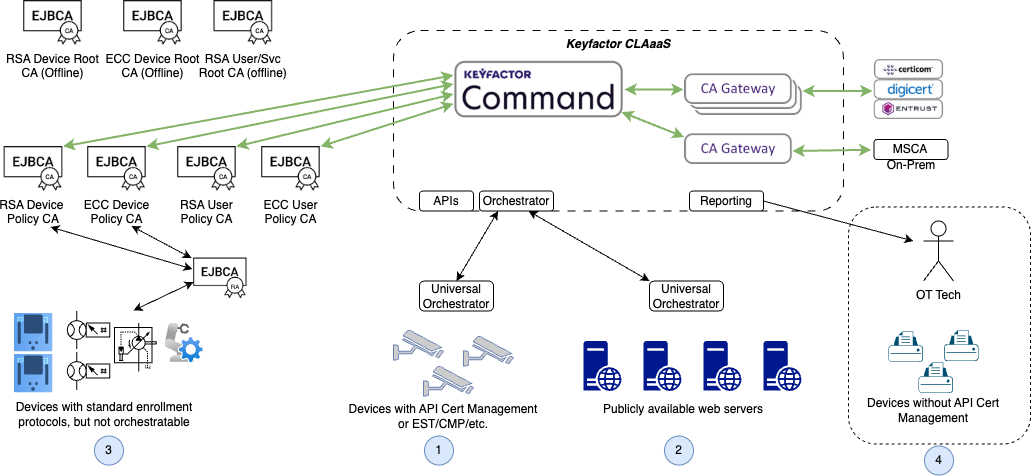
A robust PKI like EJBCA Forms the Basis
EJBCA’s flexibility is perfect to implement the entire PKI for OT, both devices and users. A single instance of EJBCA can cover all offline roots; in addition another single instance can cover all of the issuing CAs, RAs, (and VAs, if required).
However, that doesn’t account for High Availability (HA). So, providing multiple EJBCA instances can provide robust HA implementations. This discussion will not focus on EJBCA HA, as it is covered elsewhere in detail.
(See circle #3 above) EJBCA’s RA’s provide a means for devices using standard protocols (e.g., EST/SCEP/ACME/CMPv2) to enroll and get certificates. However, these protocols require the DEVICES to keep the certificates valid and up to date.
Keyfactor Command Provides Preventative Measures
A PKI like EJBCA was designed to issue certificates to valid devices, not to monitor the state of the devices or the certificates in the hierarchy. This is where Keyfactor Command excels.
Keyfactor command synchronizes its database with all of the Certificate Authorities (CAs) it is connected to. These include direct connections to all of the EJBCA CAs as well as to publicly trusted CAs (like Entrust and the like) via Keyfactor’s CA Gateways. One CA Gateway is required for each publicly trusted CA.
(See circles #3 and #4 above) For devices without the ability to poll the Keyfactor Command platform, warnings and reports can be sent to the IT Technician or OT Operational Technicians to preventatively rotate device certificates. It is key to point out that Command allows proactive measures to prevent any unexpected downtime. The time, effort, and energy expended to debug an expired certificate can help cost justify the Keyfactor Command solution.

Unplanned downtime is a key metric in manufacturing management & any way to move the downtime into a preventative maintenance (PM) window decreases COGS and increases productivity.
Keyfactor Command can Automate some devices
(See circles #1 and #2 above) Devices that allow Keyfactor to write Universal Orchestrator extensions, can have their certificates automatically replaced without any downtime. Devices, such as Bosch IP Cameras, have interfaces that allow a Universal Orchestrator to manage device certificates. Additionally, many SCADA systems (and some HMIs) leverage TLS via a web server (e.g., Ignition by Inductive Automation).
Many other Enterprise-level applications use web servers to implement their interfaces to each other. These may also use items like MQTT or CoAP/dTLS as protocols. All of these are possible candidates for automation. For example, MQTT Brokers (servers) use x.509 certificates for communications.
The Universal Orchestrator runs on a Linux or Windows server. This server is typically attached to the subnet that the devices are on. If the Universal Orchestrator can communicate to a device and that device can accept commands from the orchestrator, certificates can be managed. As there isn’t a standard interface to provide this service, each device type from a specific manufacturer needs a custom Universal Orchestrator developed. For example, the Bosch IP Camera interface works with the Tinyon IP 2000 cameras with Bosch firmware version 7.10.0095 - 7.82.
As this space becomes more standardized, Keyfactor will remain engaged & provide automation tools for these devices.
Glossary of Terms
Item | Definition |
|---|---|
CoAP | Constrained Application Protocol - A communication protocol that is lightweight and designed for constrained devices. The security layer used is typically dTLS (using UDP instead of TCP packets). |
DC Drive | Direct Current Drive - a device used to control the speed and/or torque of a Direct Current motor. This may be a stepper motor (motor that moves in increments) or a motor used for precise positional control of a gear or table or the like. Sometimes the motor is called a servo motor. |
HMI | Human Machine Interface. A Graphical User Interface (GUI) for a machine. |
HVAC | Heating Ventilation and Air Conditioning. |
IIoT | Industrial Internet of Things |
IP Camera | Internet Protocol connected camera, typically used in security systems. Talks TCP/IP. |
MQTT | MQ Telemetry Transport - A pub-sub communications protocol. It must run over a transport protocol that provides ordered, lossless, bi-directional connections. |
OPC/UA | A machine-to-machine communication protocol used for industrial automation. OPC UA simplifies industrial connectivity using a secure and platform-independent standard. |
OT | Operational Technology |
PLC | Programmable Logic Controller - a device used to control a machine or set of machines in a factory. For example, a conveyor system or bottling system. |
VFD | Variable Frequency Drive - a device used to control the speed and/or torque of an Alternating Current motor. Typically, these are induction motors used to drive things like elevators, pumps, conveyors, and the like. |