
Solution Summary - Medical Facilities
Regulations in the medical space require entities, such as hospitals and other medical facilities, to secure communications and protect patient data. As more facilities utilize connected devices to transmit patient data, it is important to implement proper mechanisms to encrypt and secure access control for these devices.
Additionally, regulations require securing network access from both users and devices to prevent unauthorized access. One attack vector is to plant a rogue device in a medical facility that attaches to a Wi-Fi network and listens for authentication traffic.
Therefore, it is important to design in access controls for both devices and users in a hospital or network facility. This solution summary outlines one way to secure this access using existing protocols.
Regulatory Framework
Typical regulations influencing hospital and medical facility network communications include:
HIPPA (Health Insurance Portability and Accountability Act):
For security, this regulation requires medical facilities to implement technical safeguards to protect electronically transmitted health information. This includes ensuring data integrity, confidentiality, and availability.
HITRUST CSF (Health Information Trust Alliance Common Security Framework):
This framework includes specific controls for providing secure and authenticated network access.
NIST (National Institute of Standards and Technology) Guidelines:
NIST SP 800 - 53 provides a framework for managing information security risk. It recommends implementing strong authentication and encryption mechanisms.
NIST SP 800 - 66 provides specific recommendations for securing health information and aligns with HIPPA requirements. This also includes securing network communications.
GDPR (General Data Protection Regulation):
A European Union (EU) specific directive. GDPR requires both organizational and technical measures to protect the security of personal data. Authentication and encryption can be a part of the measures utilized to protect data.
ISO/IEC 27001:
This international standard applies to information security management systems (ISMS). It requires implementing access to controls and encryption to protect assets.
Securing to Regulatory Standards
The common themes in all of the above standards are authentication and encryption. By utilizing Transport Layer Security (TLS) in all device communications, any user data between a device and a back office system is encrypted during transmission.
However, just securing the data in transit is not enough. Medical facilities must also assure valid devices and users are the only ones allowed to connect to the system. Mechanisms such as mutual transport layer security (mTLS) and Card Verifiable Certificates (CVC) are leveraged to prevent invalid devices and users from accessing the network and systems in medical facilities.
Securing Wi-Fi access with mTLS
Wi-Fi networks for devices in medical facilities can usually be configured to leverage strong authentication protocols. These protocols can leverage mutual TLS in which the device verifies the network access point as valid and the network access point verifies the device as valid. The IEEE 802.11 Wi-Fi standard uses mTLS in with the WPA-2 Enterprise or WPA-3 Enterprise protocols. Both of these protocols enable mTLS authentication via a RADIUS (Remote Authentication Dial-In User Service) server and the EAP (Extended Access Protocol) method. WPA-2 and WPA-3 Enterprise support EAP-TLS for authentication, which is the EAP protocol leveraging TLS for device authentication.
Enterprise grade wireless access points (WAP or AP) are designed to work with RADIUS servers for IEEE 802.1x authentication. RADIUS is a standard protocol that has been widely adopted for network access control. Additionally RADIUS servers support complex authentication scenarios and can handle large-scale deployments, making them ideally suited for medical facility and medical device authentication.
Logically, the workflow is as follows:
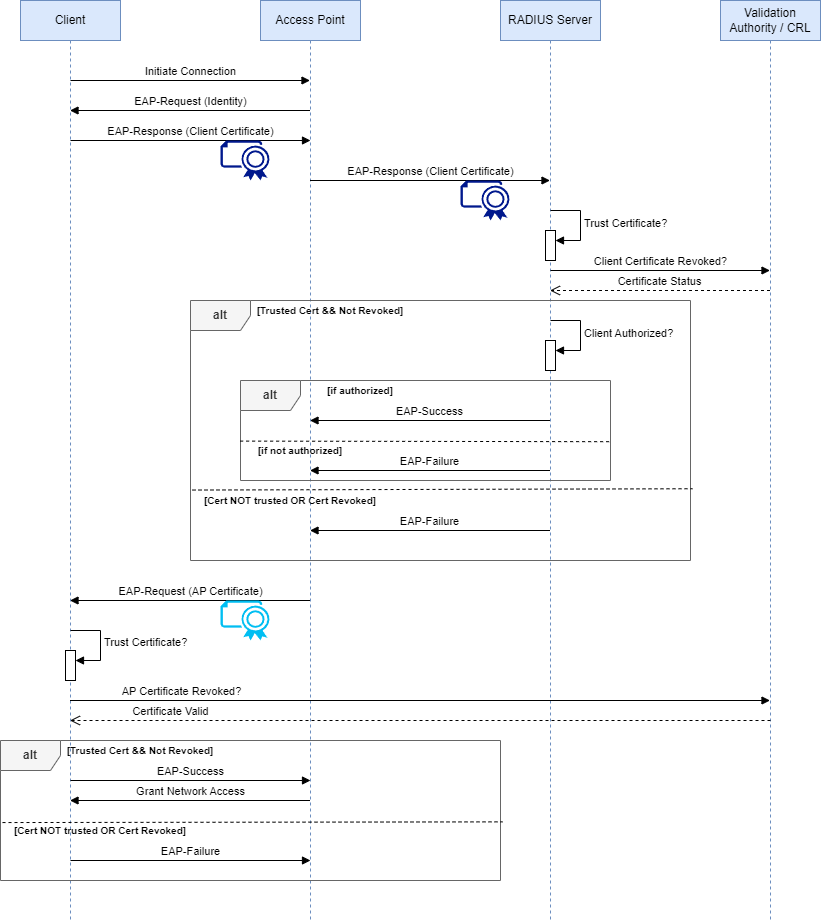
Client Initiates Connection:
The client initiates a connection to the Access Point (AP).
EAP-Request (Identity):
The AP sends an EAP-Request message to the client, requesting the client's identity.
EAP-Response (Client Certificate):
The client responds with an EAP-Response message containing its client certificate.
AP Forwards to RADIUS:
The AP forwards the EAP-Response (client certificate) to the RADIUS server.
RADIUS Verifies Client Certificate Trust & Status:
The RADIUS server checks to see if the certificate certificate chains to a Trusted Root Authority..
The RADIUS server checks the status of the client's certificate with the Validation Authority (VA) to see if it is valid or revoked.
VA Responds with Certificate Status:
The VA responds to the RADIUS server with the status of the client's certificate (valid or revoked).
Authorization Decision:
If the client's certificate is valid, the RADIUS server checks if the client is authorized to access the network.
If the client is authorized, the RADIUS server sends an EAP-Success message to the AP.
If the client is not authorized, the RADIUS server sends an EAP-Failure message to the AP.
If the client's certificate is revoked, the RADIUS server sends an EAP-Failure message to the AP.
EAP-Request (AP Certificate):
The AP sends an EAP-Request message to the client, including its own AP certificate.
Client Verifies AP Certificate Status and Trust:
The client checks to see if the AP AP certificate chains to a Trusted Root Authority.
The client checks the status of the AP's certificate with the VA to see if it is valid or revoked.
VA Responds with AP Certificate Status:
The VA responds to the client with the status of the AP's certificate (valid or revoked).
Client Sends EAP-Success or EAP-Failure:
If the AP certificate is valid, the client sends an EAP-Success message back to the AP.
If the AP certificate is revoked, the client sends an EAP-Failure message to the AP.
AP Grants Network Access:
If the client is authorized and the AP certificate is valid, the AP grants network access to the client.
Securing User Access
Medical facilities distribute badges to properly vetted employees. Newer badge technologies utilize Radio Frequency Identification (RFID) or Near Field Communications (NFC) technologies to communicate to readers. Even more secure RFID/NFC badges incorporate Secure Elements. Secure elements are specially designed integrated circuits (chips) that store cryptographic secrets and perform all cryptographic operations inside of them. Secure elements drastically increase the effort required to hack the badge.
Due to the small storage size and lower power requirements, the use of the Card Verifiable Certificate (CVC) format is common. The CVC format was designed to shrink certificate size and improve access speed in lower powered and smaller memory devices. The CVC certificate format is a standard defined by ISO/IEC 7816-8 and ISO/IEC 7816-9, which pertain to the commands for application management in integrated circuit cards. Adherence to these standards ensures interoperability with multiple devices.
Generating trust with PKI
Public Key Infrastructure (PKI) is a set of Policies and Procedures and Software that can securely provision identities. The policies and procedures set up the rules for identity vetting. Creating a strong enough identity vetting procedure allows us to trust the authority approving an identity request. A part of this trust model and processes is leveraging a robust PKI software.
EJBCA (Enterprise Java Beans Certificate Authority) by Keyfactor is one such example. EJBCA Enterprise Edition’s PKI software solution incorporates enhanced features and enterprise-grade capabilities. It offers high availability, enhanced security modules, multiple/hybrid deployment options, and dedicated support, ideal for large-scale deployments. The Enterprise Edition provides compliance with industry standards and regulations, making it ideal for organizations in regulated sectors. Additionally, it includes advanced management tools and integration options that cater to the complex requirements of large enterprises. With its robust performance, scalability, and dedicated support services, EJBCA Enterprise Edition is an essential part of a comprehensive and reliable PKI solution tailored for mission-critical environments.
PKI leverages asymmetric cryptography. In asymmetric cryptography, there are two mathematical keys generated. There is a private key and a public key. Knowing the private key allows the generation of the public key. However, having the public key does not allow for derivation of the private key. Therefore, protecting the private key is of utmost importance.
A robust solution like EJBCA integrates with a Hardware Security Module (HSM) to protect private keys. HSMs are specially designed pieces of hardware that perform all cryptographic operations (key generation, signing, encryption, hashing, etc.) inside of them. The HSMs are also designed so that you cannot extract the private keys without special procedures.
Preventing outages or unplanned downtime
While not a part of a security posture per se, the prevention of unintended down time for instruments and users is critical for a medical facility's bottom line. Planned downtime is something that is managed and quantifiable. Unplanned downtime happens during critical times & requires troubleshooting before determining root cause and applying remediation.
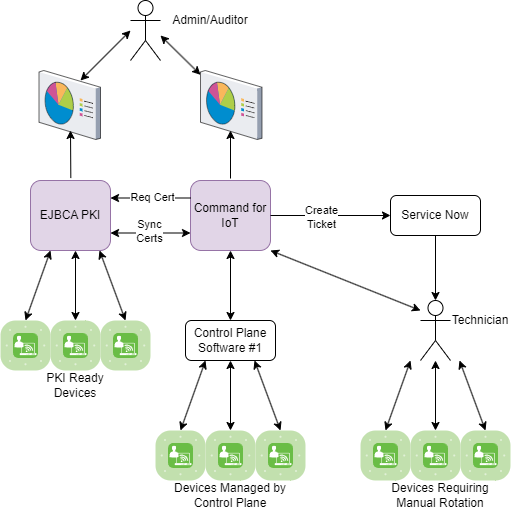
A good PKI places limits on device and user certificate lifetimes (e.g., 90 or 30 days). Therefore, knowing when device and user certificates will expire is critical in preventing any unplanned downtime associated with identities. Modern RFID/NFC cards and medical equipment can leverage middleware for this purpose. Middleware is a device (card or medical) control plane software to configure and manage devices. In the mobile domain these are known as MDM (mobile device management) solutions. Similar solutions exist in the medical device/badge arena.
Some solutions allow for rotating certificates automatically. A new keypair is generated & an associated certificate is signed by the PKI. Of particular note, a PKI is a passive thing. It responds to requests for certificates, follows the vetting process set up, and issues a certificate accordingly. Devices and software that can request certificates can interface with EJBCA using common protocols.
However, some control plane software and older devices in general, do not have the ability to manage certificates. Keyfactor has a software Command for IoT that was designed to assist in these cases. For devices that utilize control plane software, Command for IoT can integrate with this software to control the re-enrollment rules. For devices that don’t have certificate management capabilities, Command for IoT can generate reporting and automate ticket creation into software like Service Now. The ticket can be something like “EKG Cart xzy has a certificate that is expiring within the next 30 days, please renew.”
In all cases (control planes that can rotate certificates and use cases without), Command for IoT can organize certificates into buckets called collections. A collection could be “user badges”, “EKG carts”, “Manually rotated certificates”, etc. Rules for when to rotate the keys and certificates is set per collection. How to rotate the certificates is also set per collection. So, for control plane software that already rotates certificates, Command for IoT becomes a reporting tool. For devices or software without this ability, Command for IoT becomes an automation tool - either direct automation or automating ticket generation in IT or Maintenance software.
Conclusion
Creating policies and procedures that leverage state-of-the-art PKI software along with state of the art cryptography hardware support a medical facilities security posture. That security posture, when properly sponsored, documented, maintained, and audited can be used to support the argument that a medical facility is compliant with any cybersecurity regulation.
Keyfactor’s EJBCA software streamlines implementing these policies and procedures with a robust set of configurations, scalability, audit logging, security mechanisms, and hardware integrations; this makes EJBCA a perfect solution for small to large medical facilities.
When it comes to unplanned downtime prevention, adding Keyfactor’s Command for IoT brings additional functionality that goes beyond a PKI. Integrations into ticketing systems, reporting, control plane integrations and the like are available to prevent outages. If a control plane integration does not yet exist, Keyfactor’s Integrations team is on the case.
Overall, medical facilities need to meet existing laws and regulations when it comes to cybersecurity and patient confidentiality. A robust solution relies on structured policies and procedures. Keyfactor has partnered with many Fortune 100 companies to do this in the Enterprise space, and has products to assist the requirements in the Medical Facility space, too.